
ScheduleBasic - PCF Control
A Practical Scheduling Layer for Dataverse
From Planning to Execution in One Control
ScheduleBasic helps teams plan, schedule, and track work execution in real time—using a simple, calendar-first experience built directly into Model-Driven Apps.
Unlike complex project management tools, ScheduleBasic focuses on what matters for day-to-day operations: getting work scheduled, assigned, and tracked without unnecessary overhead.
👉 No heavy dependencies. No earned value tracking. Just clear, actionable scheduling.
Brief Overview Video:
Key Capabilities
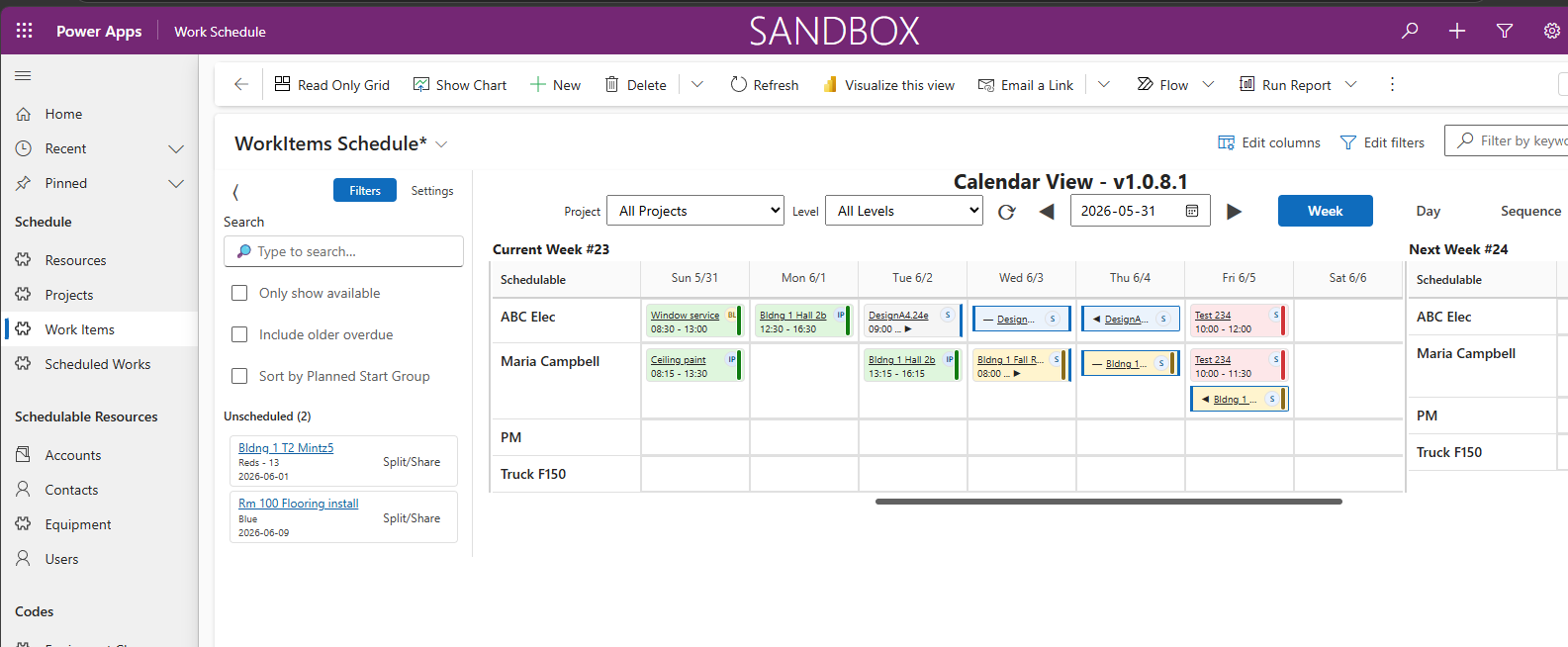
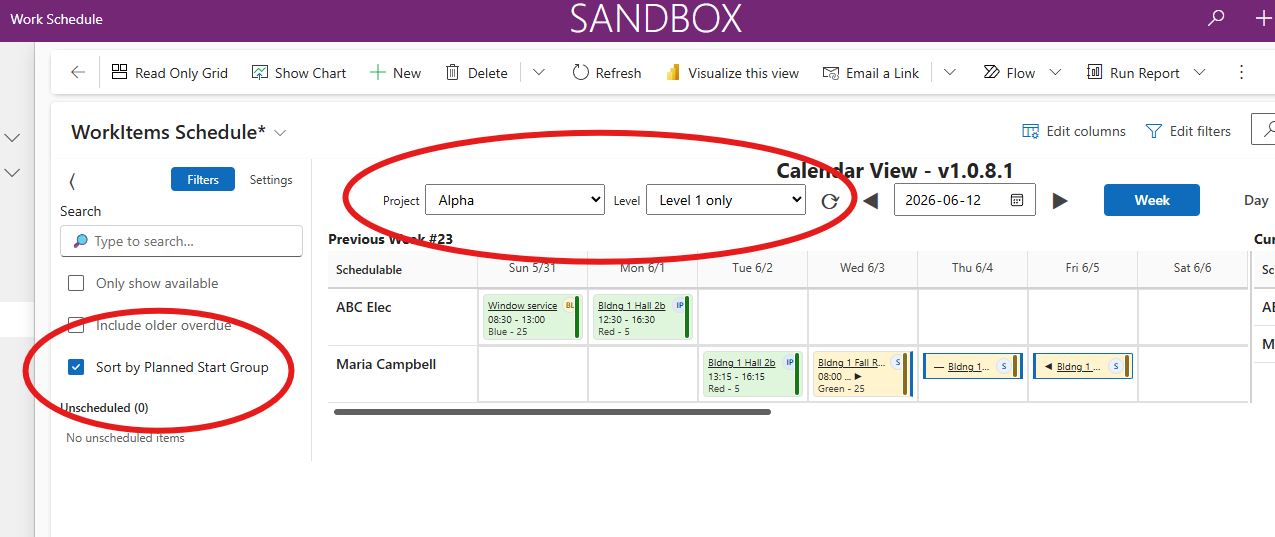
📅 Calendar-Based Scheduling
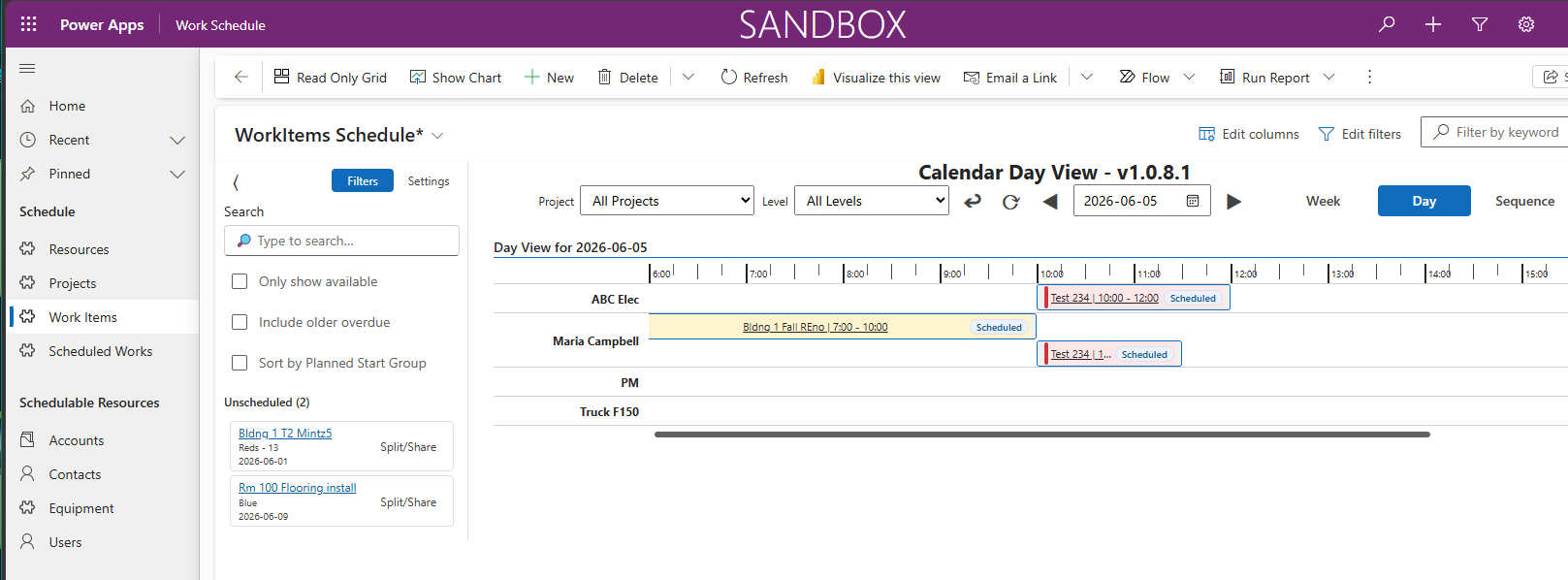
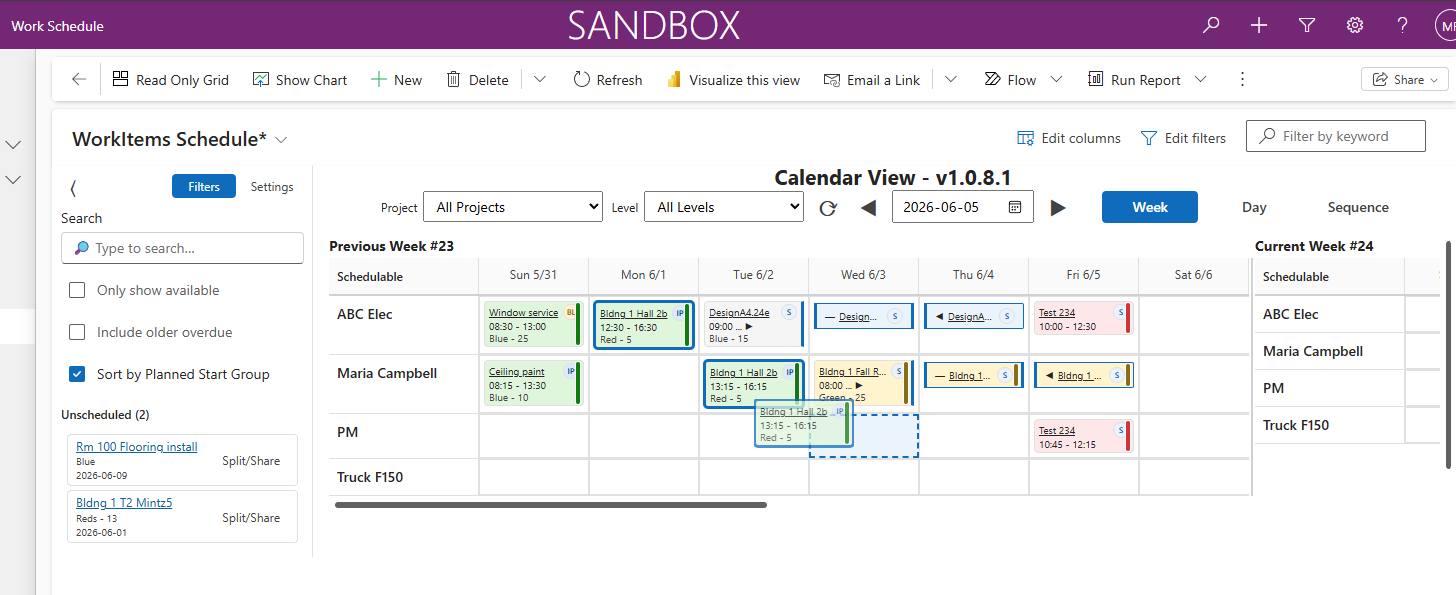
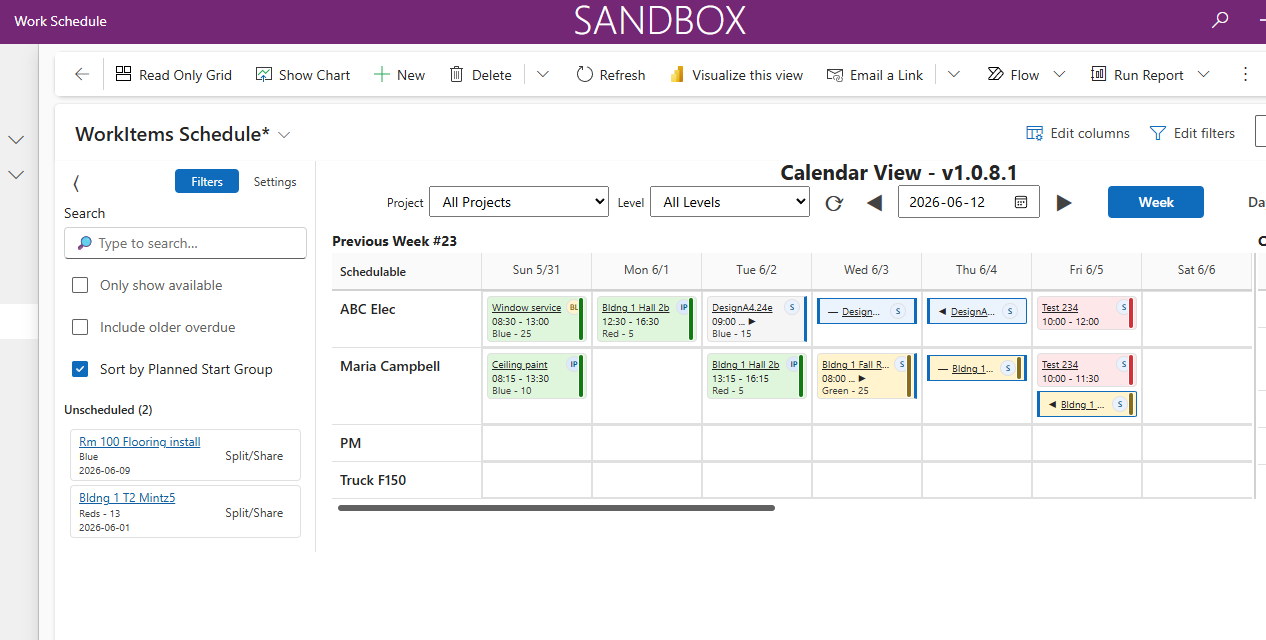
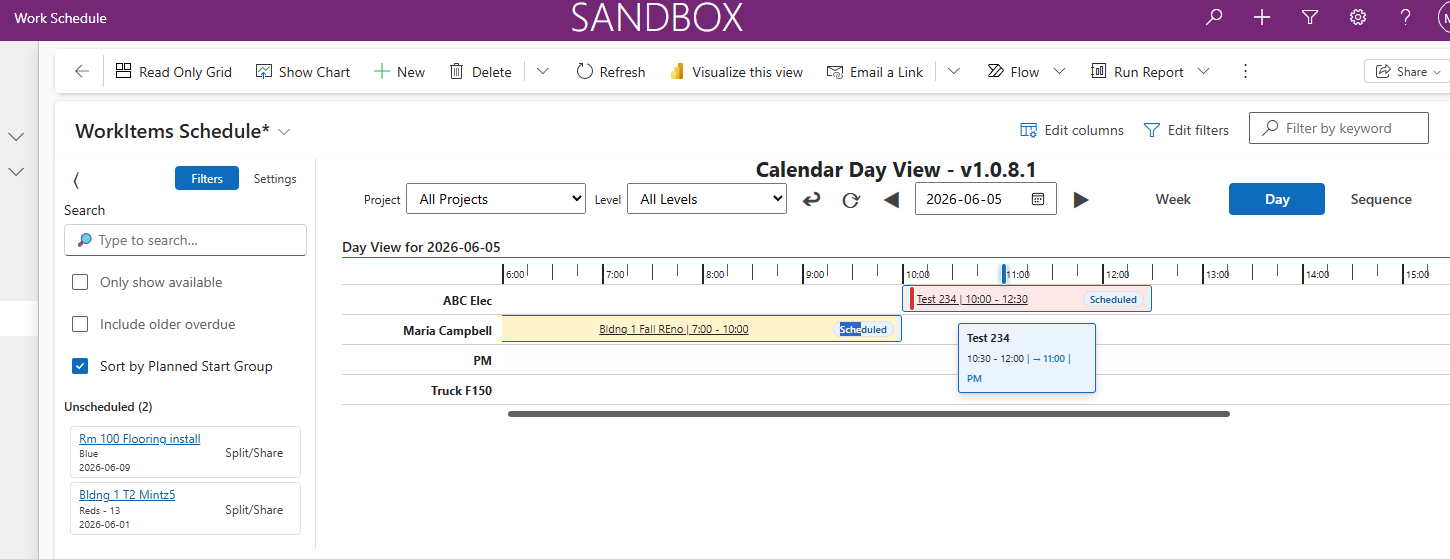
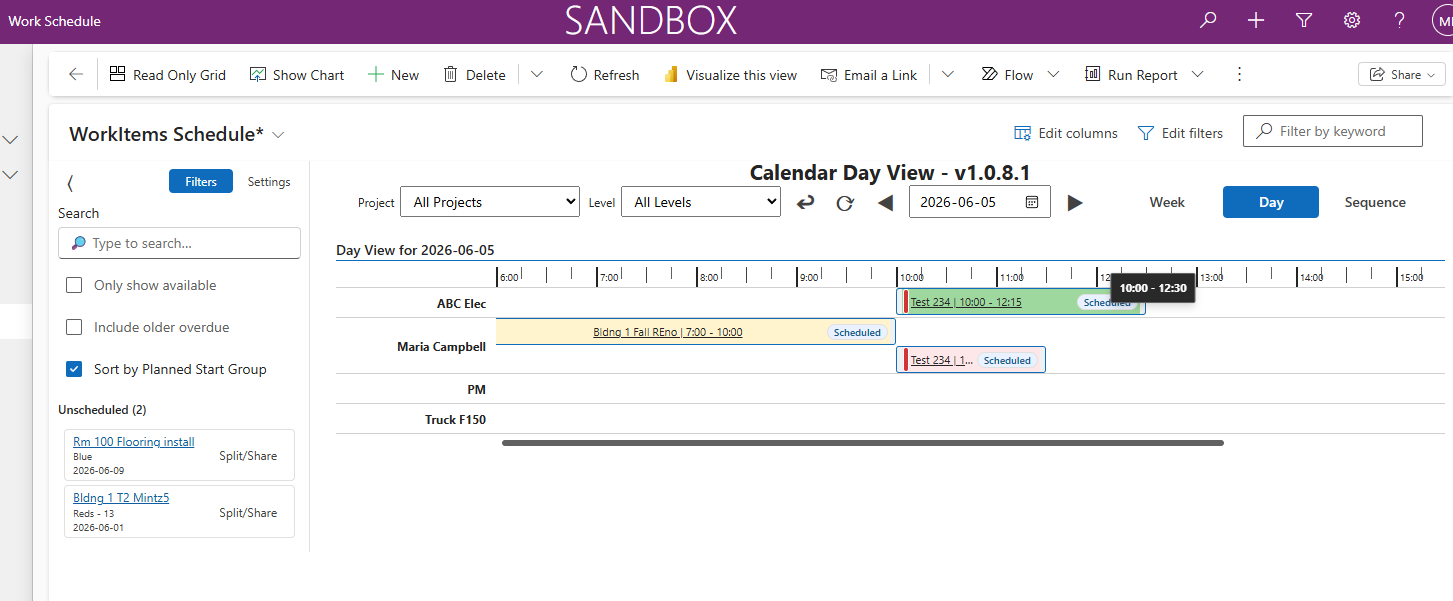
- Week view (primary) and day view for detailed operations
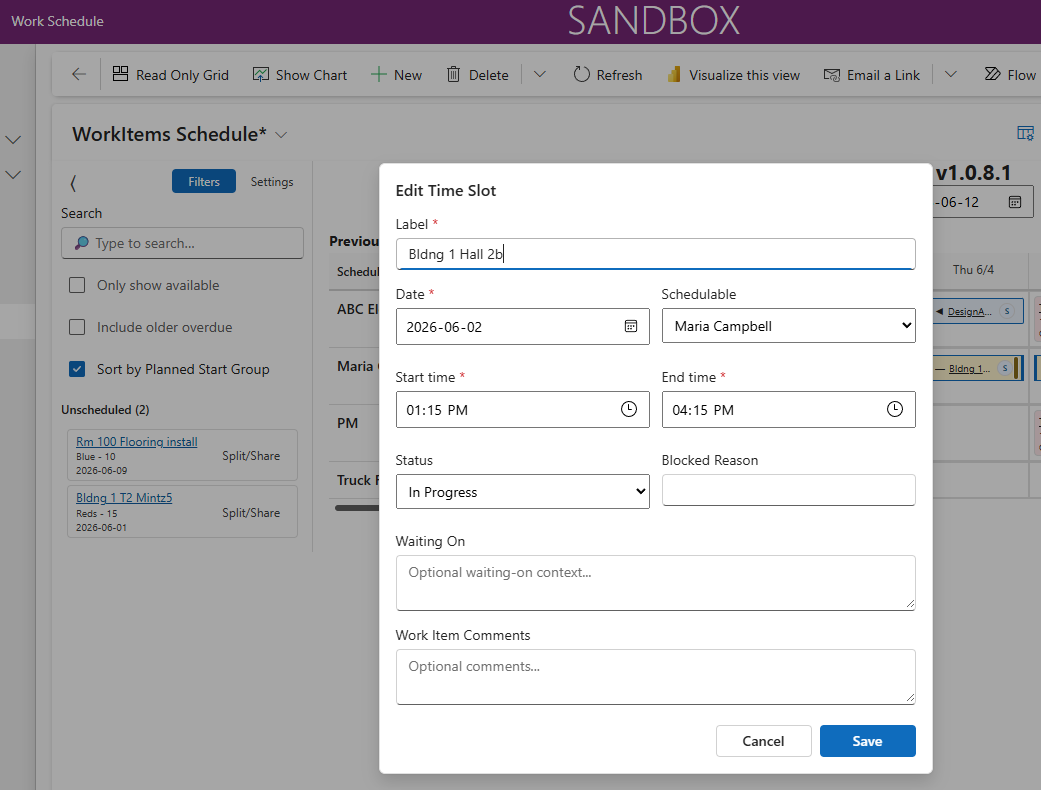
- Drag-and-drop scheduling into time slots
- Move and resize scheduled items with snap behavior
- Calendar is the source of truth for execution state
👥 Resource-Centric Scheduling
- Central Resource hub (people, trades, equipment)
- Assign work via scheduled work records, not embedded fields
- Supports single and multi-assignment scenarios
- Clear visibility of who is doing what, when
📊 Status & Progress Tracking
- Built-in statuses: Requested → Planned → In Progress → Blocked → Complete
- PercentComplete for real-world progress visibility
- Simple rollups without complex earned value tracking
- Designed for operational teams, not project accountants
Smart Data Architecture
🧾 Work + Schedule Separation
Clean, flexible data model:
- WorkItem = definition of work
- ScheduledWork = actual scheduled occurrence
- Resource = who or what is assigned
This separation enables:
- Multiple scheduled instances per WorkItem
- Multi-resource scheduling
- Clear distinction between intent vs execution
⚡ Immediate Data Persistence
- Changes save instantly to Dataverse
- Built-in retry handling for transient failures
- Conflict detection and resolution
- Designed for real-time, multi-user environments
⚡ Performance Optimized
- Handles hundreds of time slots smoothly
- 3-week rolling window for efficient data loading
- Fast filtering (<1s) and smooth interactions
- Scales to large unscheduled backlogs
🔄 Dual Modes: Planning vs Execution
ScheduleBasic simplifies the user experience by separating two distinct workflows:
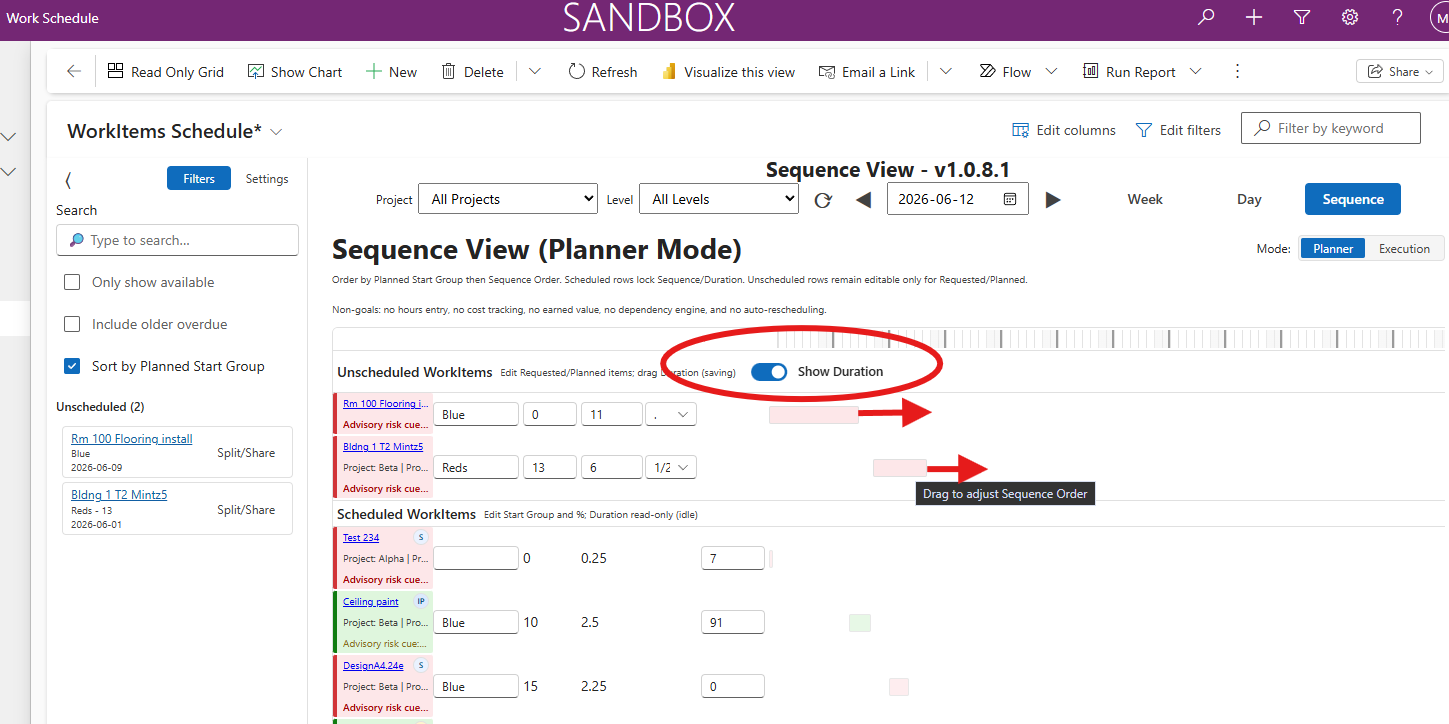
🏗️ Planner Mode
Focus: "What should happen next?"
Works on:
- Unscheduled WorkItems (backlog)
Supports:
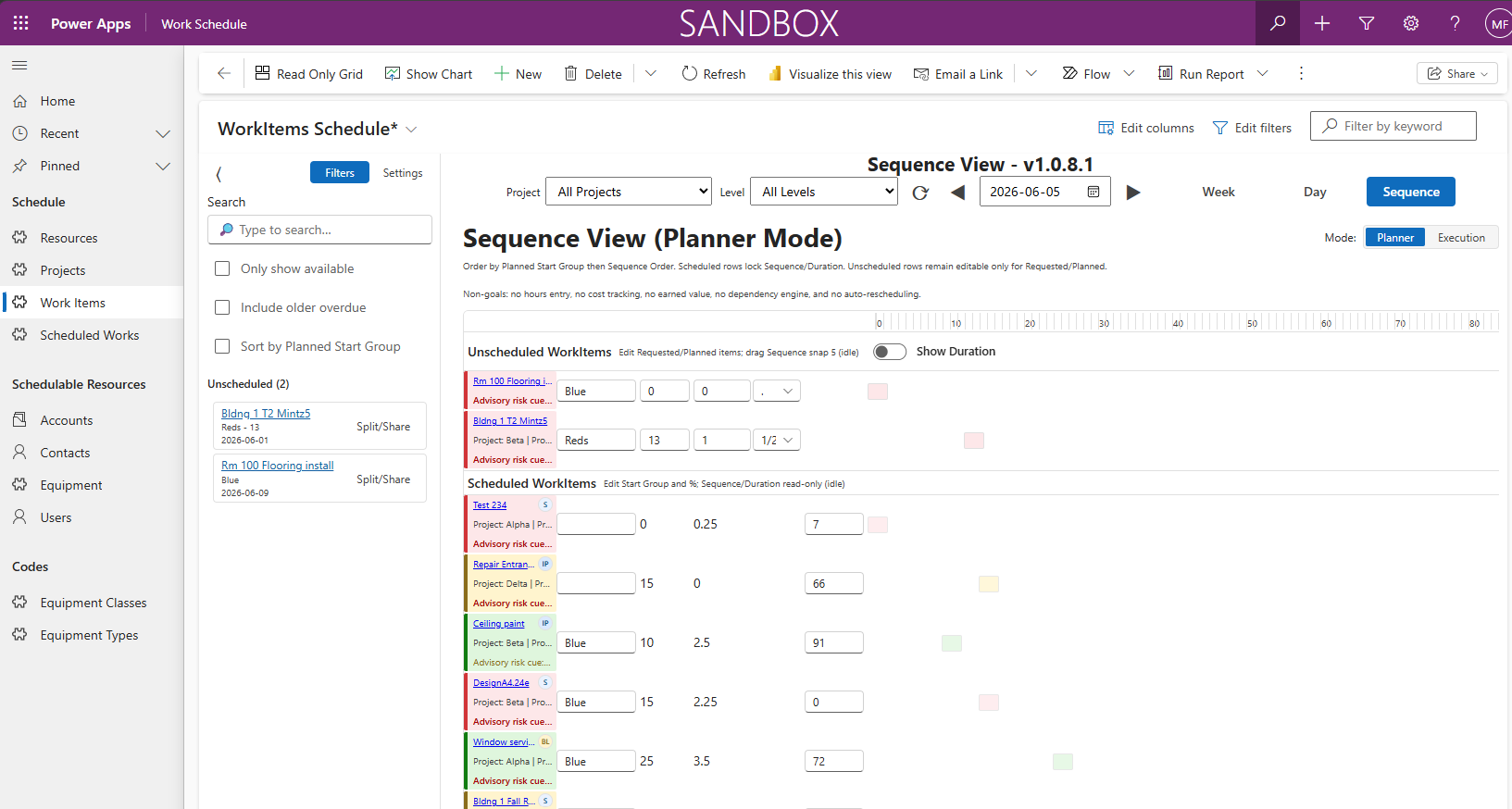
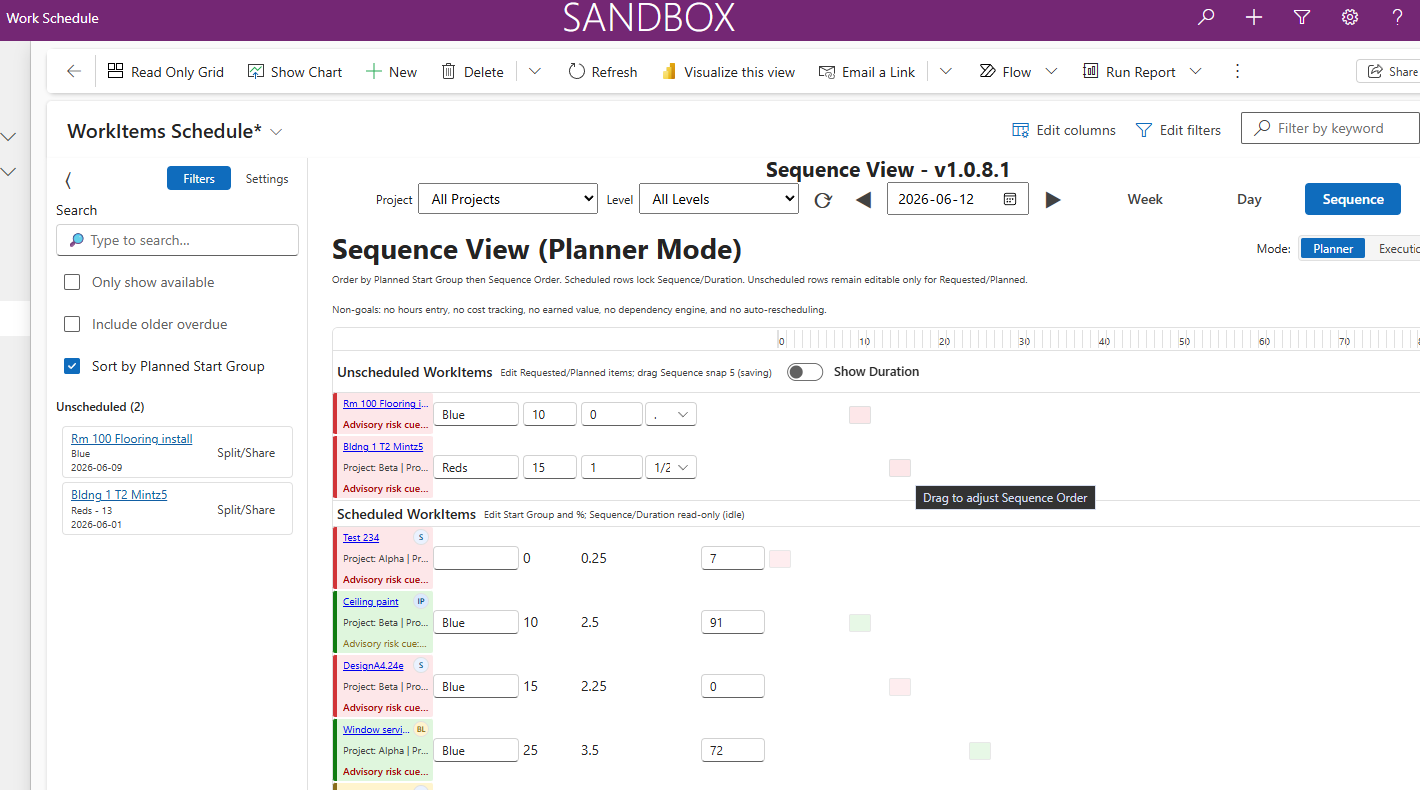
- Sequence Order – Define intended work order
- Planned Start Group – Group related work logically via text
- Duration Estimate – Optional sizing for rough planning
- Drag/snap ordering for visual sequencing
Visual Layout:
Lightweight "Sequence View" (Gantt-style) that shows order and grouping without the complexity of traditional project tools.
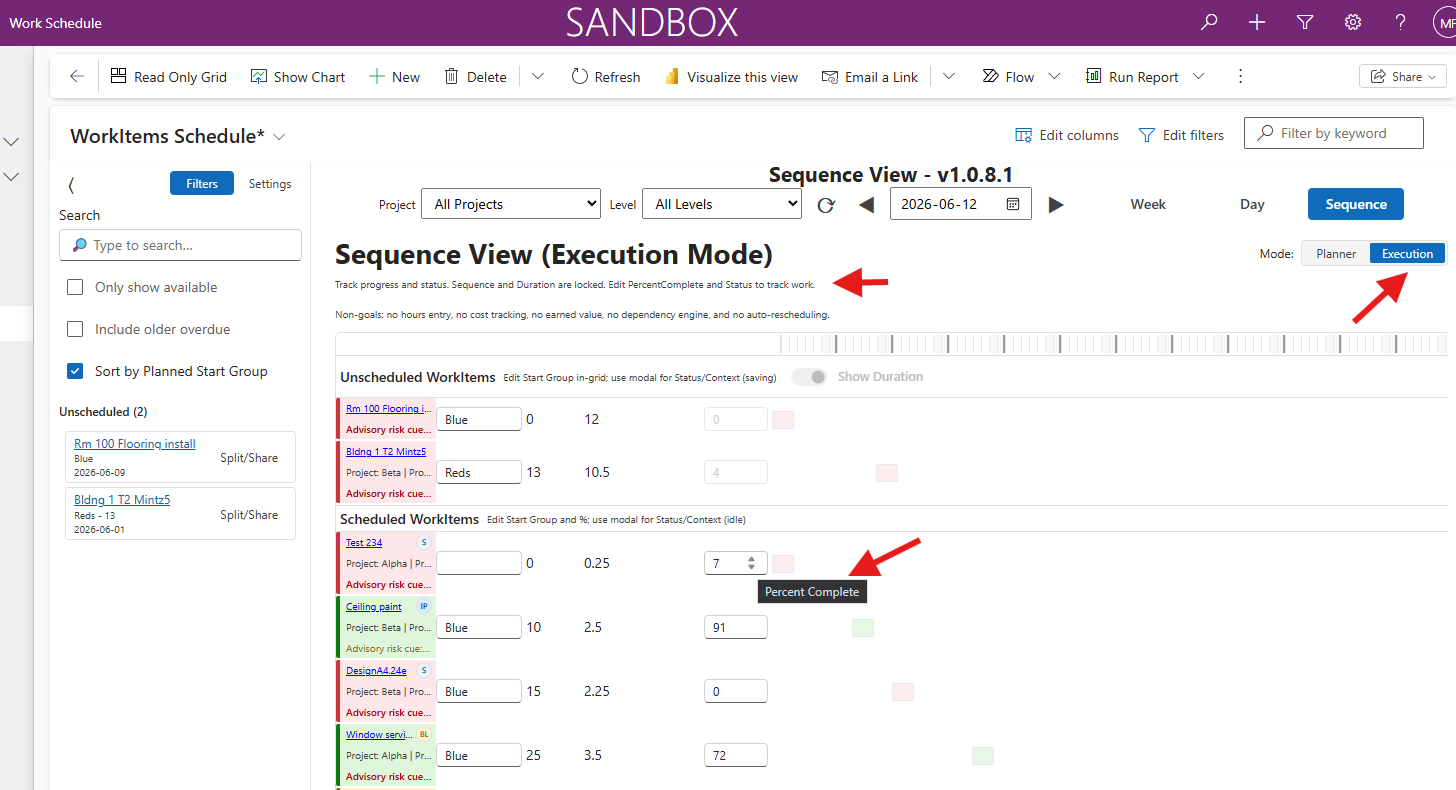
⚙️ Execution Mode
Focus: "What's happening now?"
Works on:
- Scheduled work items (from calendar view)
Supports:
- Status updates – Move work through lifecycle
- Progress tracking – Update PercentComplete
- Resource assignment – Change who's assigned
- Schedule adjustments – Move or resize time blocks
Visual Layout:
Week and day calendar views showing scheduled work with color-coded status indicators and progress bars.
👉 Each mode shows only relevant fields—no clutter, no confusion.
🧭 Lightweight Sequencing (Optional)
Plan work order before scheduling—without complex project dependencies.
SequenceView Features:
- Visual drag-and-drop ordering
- Logical grouping using Planned Start Group
- Optional duration estimates for sizing
- Lite Gantt-style visualization
What Makes It "Lightweight":
- ✅ Advisory sequencing (not enforced)
- ✅ No dependency chains or critical path
- ✅ No auto-rescheduling when dates change
- ✅ Focus on intent, not rigid constraints
This approach keeps planning simple and flexible—ideal for operational teams who need guidance, not rigidity.
Example Use Cases
ScheduleBasic is ideal for execution-oriented teams:
🏢 Facility Management Teams
- Schedule internal maintenance work orders
- Coordinate HVAC, electrical, and plumbing teams or trades
- Track preventive maintenance schedules
⚙️ Internal Operations Teams
- Manage cross-departmental work coordination
- Schedule equipment installations or upgrades
- Track completion of operational tasks
🏗️ Small Builders & Contractors
- Schedule trades across multiple job sites
- Track work phases and milestones
- Coordinate material deliveries with labor
🔧 Service Coordination Teams
- Schedule technicians and field service staff
- Manage service call routing and assignment
- Track work order completion rates
💡 Value Proposition
ScheduleBasic helps teams plan, schedule, and track work execution in real time—using a simple, calendar-first experience built directly into Model-Driven Apps.
ScheduleBasic PCF Control Screenshots
The following screenshots demonstrate the ScheduleBasic PCF control for Power Platform or Dynamics 365.
Work item planning and scheduling, and search capabilities. Click any image to view it in full size.
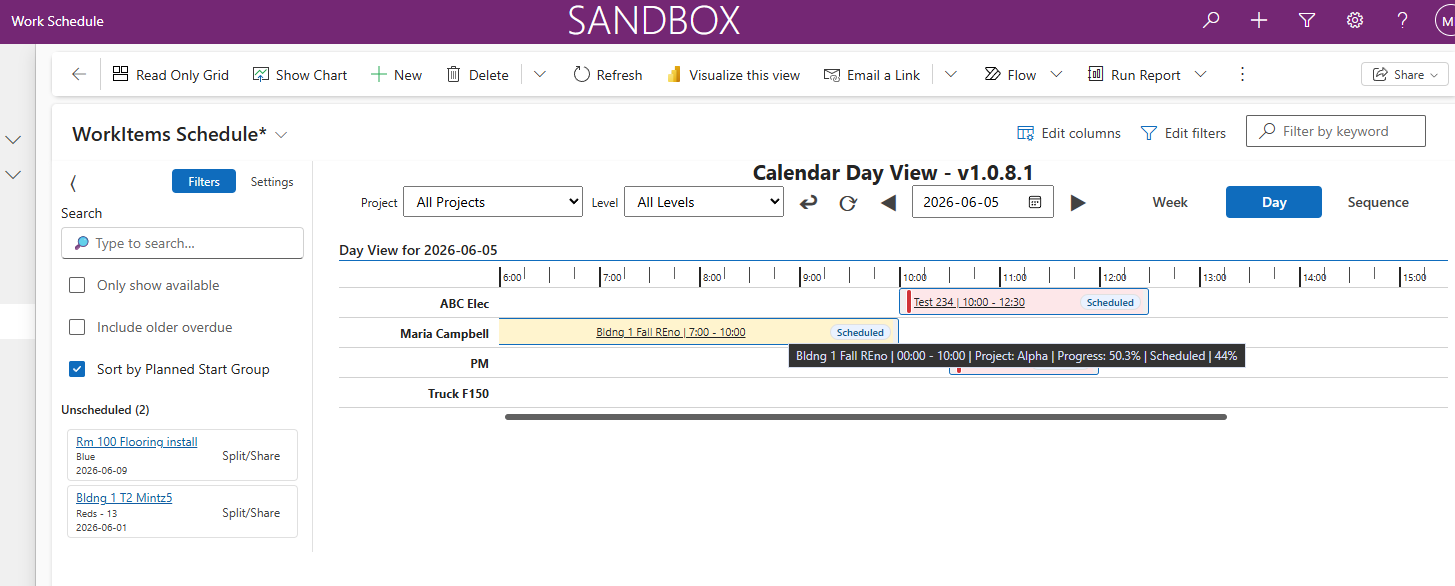
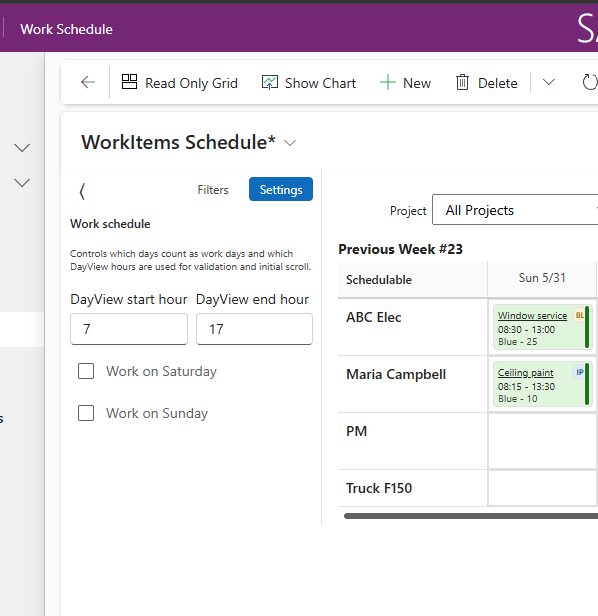
Browse screenshots to see features. Click to see a larger version.
What Problem Does ScheduleBasic Solve?
Most scheduling tools fall into two extremes:
❌ Too Simple
- Basic calendars with no structure
- No connection to work definitions
- No execution tracking or progress visibility
- Manual coordination across teams
❌ Too Complex
- Full PM systems (MS Project, Smartsheet)
- Heavy dependencies and auto-scheduling
- Cost tracking, earned value, resource leveling
- Overkill for daily operational work
✅ ScheduleBasic Fills the Gap
- Structured scheduling tied to work definitions
- Real-time execution visibility with status tracking
- Low friction calendar-based interface
- No overhead of full project systems
Why ScheduleBasic vs Full Project Management Tools?
| Aspect | Full PM Tools (MS Project, Smartsheet, etc.) | ScheduleBasic PCF |
|---|---|---|
| Setup Complexity | ❌ Complex setup with task hierarchies, dependencies, resource pools | ✅ Simple configuration via PCF properties in Model-Driven Apps |
| Learning Curve | ❌ Steep learning curve; requires PM training | ✅ Intuitive calendar interface; minimal training needed |
| Dependency Management | ⚠️ Complex dependency chains, critical path, auto-scheduling | ✅ Advisory sequencing only—no enforced dependencies |
| Cost Tracking | ⚠️ Earned value, cost baselines, budget tracking | ✅ No cost overhead—focus on execution, not accounting |
| Resource Leveling | ⚠️ Automatic resource leveling and workload balancing | ✅ Manual assignment with visual capacity awareness |
| Dataverse Integration | ❌ External tools require complex sync or connectors | ✅ Native Dataverse integration with instant data sync |
| Mobile Experience | ⚠️ Often limited or requires separate mobile apps | ✅ Works in Model-Driven Apps on any device |
| Licensing Cost | ❌ Separate licensing; often expensive per user | ✅ Included with Power Apps licensing |
| Real-Time Collaboration | ⚠️ Varies; often requires check-in/check-out | ✅ Multi-user real-time updates with conflict resolution |
| Best For | Large projects with complex dependencies, budgets, and formal governance | Operational teams needing practical scheduling without PM overhead |
🎯 Core Philosophy
ScheduleBasic is designed for teams who need structured scheduling and execution tracking—without the complexity and overhead of enterprise project management systems.
🌍 Enterprise-Ready Features
Time & Reliability
- UTC-based storage with local time rendering
- Handles daylight saving time (DST) edge cases
- Conflict-aware updates for multi-user editing
Smart Filtering & Windowing
- Loads 3-week rolling window (21 days)
- Navigation-aware data loading (Prev/Next weeks)
- Keeps backlog relevant to planning horizon
Safe, Incremental Architecture
- Feature flags for controlled rollout
- Test mode support (non-destructive)
- Designed for incremental deployment + rollback
Who Should Use ScheduleBasic?
🎯 Power Platform Professionals
- Solution Architects – Building scheduling solutions in Dataverse
- Power Platform Developers – Integrating PCF controls into Model-Driven Apps
- App Builders – Creating custom work management applications
🏗️ Operations Teams
- Operations Managers – Coordinating daily work execution
- Maintenance Coordinators – Scheduling facility and equipment work
- Service Dispatchers – Assigning field technicians to jobs
- Team Leads – Tracking work progress and status
No external services required. Works with standard Dataverse security, business rules, and workflows.
Ready to Simplify Your Work Scheduling?
ScheduleBasic provides a practical scheduling layer for Dataverse—helping teams plan, schedule, and track work execution without the complexity of full project management tools.